8GB RAM
Very limited
Try only smaller quantized models and short prompts. The operating system, Ollama, and other open apps use part of this memory too.

Appearance
Ollama CPU-only guide
Yes, Ollama can run without a GPU. CPU-only use is possible, but the speed and model choices depend heavily on your RAM, CPU, model size, quantization, and context length.
Quick answer
How CPU-only inference works
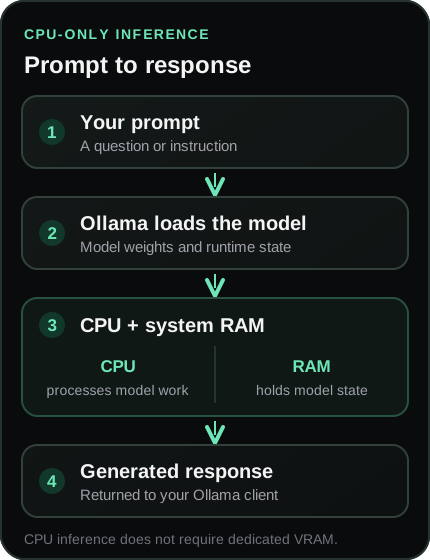
A language model processes your prompt using its loaded weights and runtime state. Without an available accelerator, that work can run on the CPU and use system RAM. A dedicated graphics card is not required for every small local model.
RAM is not all available to the model: your operating system, Ollama, the context window, and other apps also need memory. A larger context can increase runtime memory use, so begin with a modest setting and adjust to your task.
Ollama’s ollama ps command can show the processor allocation for a loaded model. See the official Ollama FAQ for memory and loaded-model details.
Have a compatible GPU but seeing CPU processing instead? Diagnose Ollama GPU usage and CPU fallback.
Planning system RAM
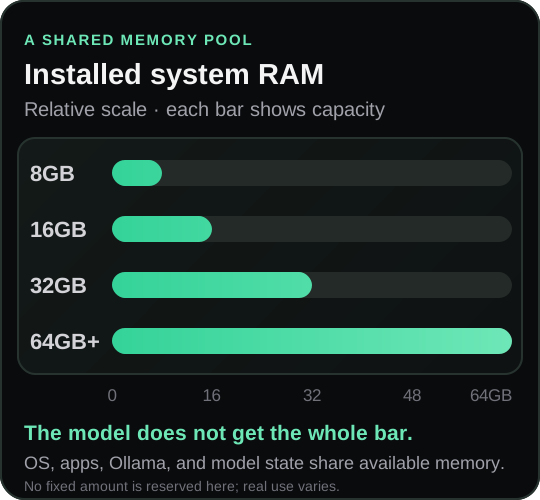
These are AIPCFit planning tiers, not official Ollama minimums or a promise that a given model will fit. The usable amount is lower than installed RAM because your OS and other software need memory too.
8GB RAM
Try only smaller quantized models and short prompts. The operating system, Ollama, and other open apps use part of this memory too.
16GB RAM
A more workable starting point for lightweight experimentation. Keep model size and context modest, especially with several apps open.
32GB RAM
More room for the runtime, longer conversations, and a broader selection of model configurations, subject to the CPU and model.
64GB+ RAM
Leaves more room to try larger configurations or other memory-heavy work. It does not guarantee a model will be practical on every CPU.
For wider hardware context, see the local AI requirements guide or the more specific Ollama system requirements overview.
Small model starting points
These examples are listed in Ollama’s official library. They are starting points to compare, not a performance ranking or a guarantee for your hardware. The selected model tag determines the downloaded package and can affect memory use.
A small text model option listed in Ollama’s library. A sensible first experiment when you want to keep the model size modest.
ollama run qwen2.5:3bAnother small text model available through Ollama. Compare its behavior on your own tasks; this guide makes no quality or speed ranking.
ollama run llama3.2:3bA smaller Gemma option in the official library. The exact package and runtime requirements are shown on its current Ollama listing.
ollama run gemma3:1bIf a model feels too demanding, choose a smaller option or a smaller quantized tag, close memory-heavy apps, or reduce the context length. Compare model data in the AIPCFit catalog, while remembering that file size is not the same as runtime memory. The Q4_K_M guide explains one common quantization label.
Getting started
ollama --version.ollama run qwen2.5:3b. Type your prompt after the model starts.ollama ps to inspect the processor split. Use ollama stop qwen2.5:3b to unload it when finished.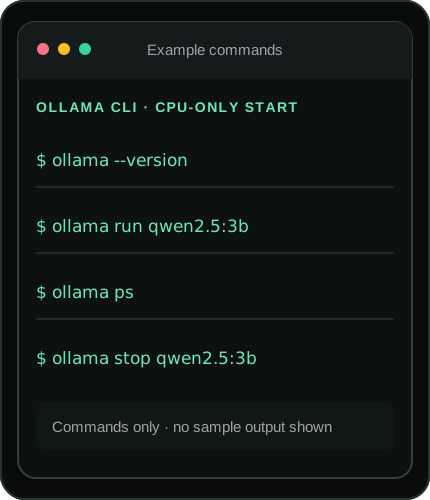
Get Ollama from the official download page and follow its quickstart for platform-specific setup.
What changes response time?
Processor architecture, supported instructions, core behavior, and sustained power affect how quickly model work can be done.
When memory is tight, the operating system may compress or page memory, which can make the whole PC less responsive.
Larger models require more data to process. Lower-bit quantization can reduce package and memory needs, with trade-offs that vary by model and task.
Longer conversations and larger prompts can use more runtime memory. Start with a shorter context if the system struggles.
Browsers, games, IDEs, and other tools compete for RAM and CPU time. Close what you do not need while troubleshooting.
A laptop or small PC can change its sustained CPU behavior based on temperature and power settings. Avoid comparing brief bursts as a promise of long-run speed.
Troubleshooting
Try a smaller model and shorter context, close CPU-heavy apps, and check whether the system is power- or heat-limited. A slow response alone does not tell you which component is the bottleneck.
Check free system memory, confirm the exact model tag, stop other loaded models, then try a smaller model or quantization and reduce context. Keep storage space available for downloads as well.
Stop the model if possible, restart with fewer apps open, and choose a smaller configuration. Avoid keeping a model loaded alongside other memory-heavy work on a constrained PC.
System RAM is main memory used by the CPU. VRAM is dedicated memory on a graphics card. CPU-only inference uses system memory; integrated graphics and Apple Silicon may use shared or unified memory instead of a separate VRAM pool.
Choose your next step
AIPCFit helps compare hardware and model configurations. Treat compatibility and memory planning as guidance; neither is a measured CPU benchmark or a guarantee for every context setting.
Common questions
Yes. Ollama can run models with CPU inference using system memory. A discrete GPU is not required for every model or setup; model size, available RAM, CPU, context, and runtime affect what is practical.
It can be slower than a supported GPU-accelerated setup, but the difference varies with the processor, model, quantization, context, and memory behavior. There is no useful universal speed figure for every PC.
It can be a very limited starting point for small quantized models and short prompts. The operating system and other apps also need memory, so 8GB does not guarantee that a particular model will load comfortably.
16GB is a more practical starting point for lightweight experimentation, but fit still depends on the model package, context length, CPU, runtime, and how much memory is free.
There is no single best model for every CPU-only PC or task. Try a small official-library option such as Qwen2.5 3B, Llama 3.2 3B, or Gemma 3 1B, then compare output quality and responsiveness for your own use.
You do not need dedicated GPU VRAM for CPU inference. System RAM is used for CPU-side model work. Integrated graphics or Apple Silicon can use shared or unified memory, which is different from dedicated VRAM.
Yes, if its CPU, operating system, available system memory, and storage are adequate for the chosen model. Start small and keep expectations modest; laptop cooling and power settings can also affect sustained workloads.